2Dでも3Dでもゲーム作ってれば必ずアイコンが必要になってくる場面がでてきます。
できれば自分オリジナルのものが作りたい。気に入ったものができるまでリテイクしたい。などあると思います。
今回は、Stable Diffusionを使ってアイテムアイコンを作るところをやってみたいと思います。
よくわからないので、とりあえずこれと同じものを出してみようと思います。

Lora
今回は、やりたいこと(上の画像のようなものが作りたい)が決まっていて、使いたいLoraがあったので先にLoraを選択しました。

このLoraのBase ModelがSDXL1.0なのでSDXLの中から選びます。
モデル
どんなモデルを選ぶかは、自分が作成したいゲームの作風にマッチしたものを探すのがよいかと思います。とりあえず、投稿されているイメージの通りそのままやってみようと思います。SDXLをダウンロードします。

画像のものは「V1.0」ですが、今回は「V1.0VAE fix」で試したいと思います。
設定
Positive Promp
2d icon. a red and white cape with a red bow.,<lora:SDXL icon V2:1>,Negative Prompt
blurry,lowres,その他の設定は以下です。SDXLは、画像サイズが1024x1024以上が推奨されているのでこのサイズで出してみます。
| Sampling method | Euler a |
| Scedule Type | Automatic |
| Sampling steps | 25 |
| Width | 1024 |
| Height | 1024 |
| CFG Scale | 7 |
| Seed | 1 |
出力結果が以下です。

なんじゃこりゃ、ひどい・・・。同じにしたのに・・・。出力結果をみると
2d icon. a red and white cape with a red bow.,<lora:SDXL icon V2:1>,
Negative prompt: blurry,lowres,
Steps: 25, Sampler: Euler a, Schedule type: Automatic, CFG scale: 7, Seed: 1, Size: 1024x1024, Model hash: e6bb9ea85b, Model: sdXL_v10VAEFix, VAE hash: 63aeecb90f, VAE: sdxl_vae.safetensors, Clip skip: 2, Version: v1.10.1

Lora not found: SDXL icon V2
ってなってました。「SDXL icon V2」のLoraがないって言ってますね。
調べたところ、他の拡張機能でPromptの整形が入ったときに、Loraの名前を変更してしまった(<lora:SDXL_icon_V2:1> → <lora:SDXL icon V2:1>)ようです。
調整します。
というわけで、Loraの名称を直して、さらにトリガーワードを入れてみます。
Positive Promptを以下のようにしました。
2d icon. a red and white cape with a red bow.,<lora:SDXL_icon_V2:1>,icon他はさっきと一緒ですが、記載しておきます。
Negative Prompt
blurry,lowres,その他の設定は以下です。
| Sampling method | Euler a |
| Scedule Type | Automatic |
| Sampling steps | 25 |
| Width | 1024 |
| Height | 1024 |
| CFG Scale | 7 |
| Seed | 1 |
これで出力した結果は、これです。

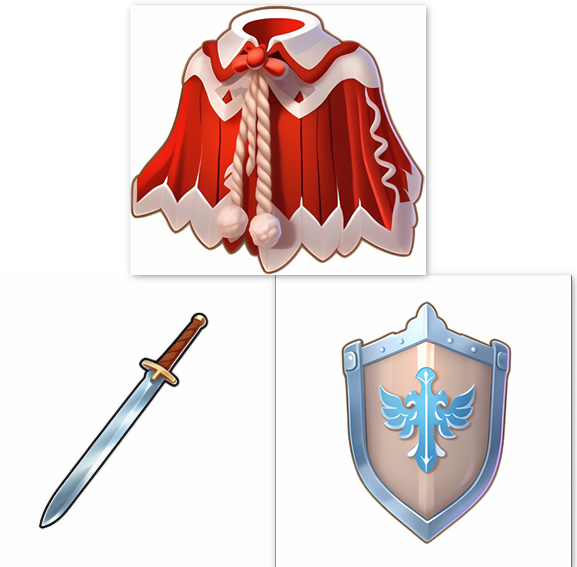
結構いいかんじですね。他のも試してみようと思います。
剣を作ってみた。
他のを試す場合、Sampling stepsは10以下の低めに設定しておいて、どんな感じの出力か確かめたあと、数値を上げて確認した方が時間の節約になります。

2d icon.,straight,a single sword,fantasy,long sword,sharp,silver blade,<lora:SDXL_icon_V2:1>,icon,
Negative prompt: blurry,lowres,curve,multiple,
Steps: 25, Sampler: Euler a, Schedule type: Automatic, CFG scale: 7, Seed: 666, Size: 1024x1024, Model hash: e6bb9ea85b, Model: sdXL_v10VAEFix, VAE hash: 63aeecb90f, VAE: sdxl_vae.safetensors, Clip skip: 2, Lora hashes: "SDXL_icon_V2: 9ef9e9a33a34", Version: v1.10.1
2d icon.,a simple iron long sword with a straight blade.,<lora:SDXL_icon_V2:1>,icon,
Negative prompt: blurry,lowres,
Steps: 13, Sampler: Euler a, Schedule type: Automatic, CFG scale: 7, Seed: 2018053433, Size: 1024x1024, Model hash: e6bb9ea85b, Model: sdXL_v10VAEFix, VAE hash: 63aeecb90f, VAE: sdxl_vae.safetensors, Clip skip: 2, Lora hashes: "SDXL_icon_V2: 9ef9e9a33a34", Version: v1.10.1
とりあえず、いろんなプロンプトを試して、全部で100枚くらい出した中でマシな選びました。納得は言ってません。刃はまっすぐにならんかな。
盾も作ってみた

parameters

2d icon.,a single shield,fantasy,<lora:SDXL_icon_V2:1>,icon,
Negative prompt: blurry,lowres,curve,multiple,
Steps: 25, Sampler: Euler a, Schedule type: Automatic, CFG scale: 7, Seed: 523602767, Size: 1024x1024, Model hash: e6bb9ea85b, Model: sdXL_v10VAEFix, VAE hash: 63aeecb90f, VAE: sdxl_vae.safetensors, Clip skip: 2, Lora hashes: "SDXL_icon_V2: 9ef9e9a33a34", Version: v1.10.1
あとは背景の透過とサイズの縮小をしてあげれば、ゲーム内のアイコンとして使えそうです。
結構、シンプルなPromptのほうが、余計な解釈をAIがして出したいもの以外のものが出てきてしまうようなことがないという感じがします。

コメント